
In India, a Voter ID card is one of the most important identity documents for every eligible citizen. It not only allows you to participate in elections but also works as valid proof of identity and address. Voter Card Download has now become extremely easy due to digital initiatives by the Election Commission of India (ECI). Therefore, you no longer need to visit offices or stand in long queues to access your voter details.
What Is a Voter Card?
A Voter Card, officially known as an EPIC (Electors Photo Identity Card), is issued by the Election Commission of India to citizens aged 18 years or above. It confirms your eligibility to vote in local, state, and national elections. Additionally, it includes essential details such as your name, photograph, date of birth, address, and EPIC number.
However, the importance of a voter card goes beyond elections. In fact, it is widely accepted as identity proof for banking, SIM card verification, government schemes, and travel purposes. Therefore, keeping a digital or physical copy is always recommended.
How to Download Voter ID Card Online
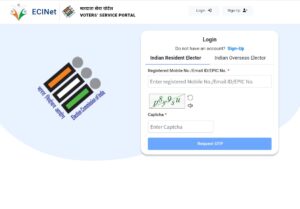
The Election Commission has simplified Voter Card through its official portals. As a result, anyone can access their voter ID from home.
Steps to Download Voter ID Online
- Visit the official ECI portal (NVSP or Voters’ Service Portal).
- Select the “Download e-EPIC” option.
- Enter your EPIC number or registered mobile number.
- Verify using OTP.
- Download the PDF file.
Moreover, this digital voter ID is legally valid across India. Therefore, you can use it wherever voter identification is required.
E-Voter Card Download
An e-Voter Card, also called e-EPIC, is the digital version of the physical voter ID. It is available in PDF format and can be stored on your mobile or computer. Additionally, it can be printed if needed.
Key benefits of e-Voter Card Download:
- Easy to store and access anytime
- Secure QR code verification
- Accepted at polling booths
- Useful when physical card is lost
However, users must ensure that their mobile number is linked with EPIC to receive OTP. Therefore, updating voter records is important.
PVC Voter Card Download
A PVC Voter Card is a durable, wallet-sized plastic card similar to an Aadhaar card. Although PVC cards are not exactly “downloaded,” the application process starts online.
How to Get a PVC Voter Card
- Download your e-EPIC first
- Visit the official ECI PVC card service
- Pay a nominal fee
- Receive the PVC card by post
Moreover, PVC cards are waterproof, long-lasting, and easy to carry. Therefore, many voters now prefer them over laminated paper cards.
How to Download Voter ID Card with Aadhaar
Linking Aadhaar with your voter ID helps in easy verification and duplicate prevention. Consequently, Voter Card becomes smoother when Aadhaar details are updated.
Steps Using Aadhaar
- Visit the voter portal
- Choose Aadhaar linking or e-EPIC download
- Enter Aadhaar number and EPIC details
- Verify with OTP
- Download your voter ID
However, Aadhaar linking is voluntary. Still, it improves accuracy and speeds up digital services.
How to Download Voter ID Card Without EPIC Number
If you have lost your EPIC number, you can still complete Voter Card using alternative details.
Methods Without EPIC
- Search voter details by name and date of birth
- Use registered mobile number
- Verify using OTP
Moreover, once you retrieve your EPIC number, save it for future use. Therefore, it helps avoid repeated searches.
How to Download Voter ID Card from DigiLocker
DigiLocker is a secure government platform that stores digital documents. Fortunately, voter IDs are now available on DigiLocker.
Steps to Download via DigiLocker
- Login to DigiLocker using Aadhaar or mobile number
- Go to “Issued Documents”
- Select Election Commission of India
- Choose Voter ID
- Download or save the document
Additionally, DigiLocker voter IDs are legally valid. Therefore, you can use them for verification whenever required.
Voter Card Download in Haryana
Residents of Haryana can easily complete Voter Card Download using the national voter portal. The process remains the same across India.
However, Haryana voters should ensure their constituency details are correct. Moreover, state-level updates are quickly reflected in the central database.
Tip: Always verify polling station details before elections.
Voter Card Download in Bihar
In Bihar, voter services are fully integrated with the Election Commission’s digital system. Therefore, citizens can download voter cards without visiting local offices.
Additionally, Bihar voters often use mobile-based services for faster access. However, keeping the registered mobile number active is essential.
Voter Card Download in Andhra Pradesh
Andhra Pradesh voters can access voter services through both national and state-linked portals. Voter Card Download is smooth and user-friendly.
Moreover, Andhra Pradesh has high digital adoption, which helps in faster grievance redressal and updates. Therefore, corrections and downloads are handled efficiently.
Why Voter Card Download Is Important
Digital access to voter ID ensures transparency, convenience, and inclusion. Moreover, it supports the government’s Digital India initiative. In fact, it empowers citizens by reducing dependency on physical documents.
Therefore, whether you are a first-time voter or someone who lost their card, online access makes the process hassle-free.

