
RC Download Online has become an essential digital service for vehicle owners in India. Nowadays, instead of carrying a physical Registration Certificate everywhere, users can easily access a digital RC PDF online. As a result, the Government of India has simplified vehicle-related services through Parivahan, DigiLocker, and the mParivahan app.
Moreover, RC Download helps vehicle owners save time, avoid unnecessary visits to the RTO, and stay compliant with traffic rules. In this guide, you will learn everything about RC Download, including step-by-step methods, benefits, legal validity, and common issues.
What is RC Download?
RC refers to the online process of downloading the Vehicle Registration Certificate (RC) in digital PDF format. Essentially, the RC is an official document issued by the Regional Transport Office (RTO) that proves vehicle ownership and registration details.
Earlier, vehicle owners depended only on physical RC cards. However, with digital initiatives like Parivahan and DigiLocker, RC Online has become quick and secure. Therefore, users can now access their RC anytime using a vehicle number or registered mobile number.
Additionally, RC Download includes details such as:
- Vehicle number
- Owner’s name
- Registration date
- Engine and chassis number
- Fuel type and vehicle class
Thus, RC plays a crucial role in modern vehicle documentation.
Benefits of RC Download Online
There are several advantages of RC Online, especially for daily commuters and vehicle owners. First of all, it provides instant access to your RC without paperwork.
Moreover, some major benefits include:
- Easy accessibility: RC PDF can be accessed anytime, anywhere
- Paperless solution: No need to carry physical RC
- Government-approved: Issued via official platforms like Parivahan
- Accepted by traffic police: Digital RC is legally valid
- Saves time: No RTO visit required
As a result, RC Online supports India’s Digital India initiative and makes vehicle management stress-free.
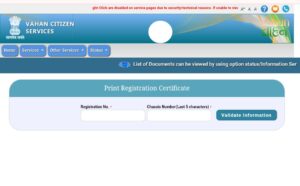
How to Download RC from Parivahan Website
The Parivahan website is the most trusted and official platform for RC. Therefore, most users prefer this method.
Step-by-Step RC Download from Parivahan
- Visit parivahan.gov.in
- Click on Online Services
- Select Vehicle Related Services
- Enter your vehicle registration number
- Verify details using OTP
- Download your RC PDF
Furthermore, the Parivahan RC process is completely free and secure. However, ensure that your mobile number is linked with your vehicle registration for OTP verification.
Consequently, this method is best for users who want a direct RC PDF from the government portal.
RC Download by Vehicle Number
RC by vehicle number is one of the easiest methods available today. In fact, you do not need any additional documents if your vehicle details are already registered.
To proceed, simply enter:
- Vehicle Registration Number
- Registered Mobile Number
- OTP received
After verification, you can instantly view and download your RC. Therefore, RC by vehicle number is highly convenient for both new and old vehicle owners.
Additionally, this method works seamlessly on Parivahan, DigiLocker, and mParivahan platforms.
RC Download via DigiLocker & mParivahan App
Apart from Parivahan, RC is also available through DigiLocker and mParivahan apps. These platforms are officially linked with the Ministry of Road Transport and Highways (MoRTH).
RC Download via DigiLocker
- Install DigiLocker app
- Sign in using Aadhaar or mobile number
- Go to Issued Documents
- Select Ministry of Road Transport
- Download RC PDF
RC Download via mParivahan App
- Install mParivahan app
- Enter vehicle number
- Verify via OTP
- Access digital RC
Moreover, both platforms automatically fetch vehicle data. As a result, RC becomes faster and more reliable.
Is Digital RC Valid in India?
Yes, Digital RC is fully valid in India. According to the Motor Vehicles Act and official government notifications, RC PDFs from Parivahan, DigiLocker, and mParivahan are legally accepted.
Furthermore, traffic police and enforcement agencies recognize digital RC during inspections. Therefore, carrying a physical RC is no longer mandatory if you have a valid digital copy.
However, always ensure that:
- RC is downloaded from an official source
- Details are clearly visible
- The app is updated
Thus, Digital RC ensures both legal compliance and convenience.
Common Problems While RC Download
Although RC Online is simple, users may sometimes face issues. However, most problems can be resolved easily.
Common Issues Include:
- Mobile number not linked with RC
- Incorrect vehicle number entered
- OTP not received
- Server downtime on Parivahan
- RC not updated in database
How to Fix These Issues
- Visit your nearest RTO to update mobile number
- Recheck vehicle registration details
- Try downloading during non-peak hours
- Use DigiLocker or mParivahan as alternatives
As a result, users can successfully complete RC without delays.

