
In today’s digital India, Aadhaar has become an essential identity document for almost every service—banking, government schemes, SIM verification, and more. Therefore, knowing how My Aadhaar Card Download works is extremely important for every resident. Moreover, UIDAI has made the process fully online, fast, and secure. However, many users still feel confused about login methods, passwords, or downloading Aadhaar without a mobile number.
What Is My Aadhaar Card?
My Aadhaar Card refers to the digital version of your Aadhaar issued by the Unique Identification Authority of India (UIDAI). In fact, it is legally valid just like the physical Aadhaar card. Therefore, you can use it anywhere Aadhaar proof is required.
Moreover, the digital Aadhaar is available in different formats such as e-Aadhaar, Masked Aadhaar, and Aadhaar PDF. However, all versions carry the same unique 12-digit Aadhaar number. Additionally, the digital copy is protected with encryption and a password, which ensures data safety.
Meanwhile, UIDAI allows residents to access their Aadhaar anytime through its official website or the mAadhaar mobile app. As a result, My Aadhaar Card Download has become easier than ever before.
How to Download My Aadhaar Card Online
Downloading Aadhaar online is a straightforward process if you follow the correct steps. Therefore, always use the official UIDAI website to avoid fraud.
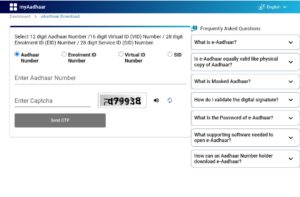
First, visit the UIDAI portal and go to the “Download Aadhaar” section. Then, enter your Aadhaar number, Enrolment ID (EID), or Virtual ID (VID). After that, you must verify your identity using an OTP sent to your registered mobile number.
Moreover, once the OTP is verified, you can download the Aadhaar PDF instantly. However, remember that the downloaded file is password-protected. Additionally, this online method is the safest way for My Aadhaar Card Download, as it directly comes from UIDAI servers.
Can I Download My Aadhaar Card Online?
Yes, absolutely. In fact, UIDAI encourages residents to use online services instead of visiting Aadhaar centres. Therefore, My Aadhaar Card Download can be done anytime, anywhere, using a smartphone or computer.
However, you must have access to the mobile number registered with Aadhaar for OTP verification. Moreover, the online service works 24/7, which means there is no waiting time. Additionally, it helps save both time and effort.
Meanwhile, if your mobile number is not linked, you still have limited options, which we will discuss later. As a result, online Aadhaar download remains the most preferred and trusted option.
My Aadhaar Card Download Login (UIDAI Portal)
The UIDAI portal provides a secure login system for Aadhaar-related services. Therefore, when you try My Aadhaar Card Download, UIDAI verifies your identity through OTP instead of a traditional username and password.
First, you need to enter your Aadhaar number or VID. Then, UIDAI sends an OTP to your registered mobile number. After entering the OTP, you get temporary access to download your Aadhaar.
Moreover, this OTP-based login reduces the risk of unauthorized access. However, you must ensure that your mobile number is active. Additionally, never share your OTP with anyone, as UIDAI never asks for it via calls or messages.
UIDAI My Aadhaar Card Download
UIDAI is the only official authority that issues Aadhaar. Therefore, UIDAI My Aadhaar Card Download is the most reliable and legally valid method.
Through UIDAI services, you can download:
- Regular e-Aadhaar
- Masked Aadhaar (partially hidden Aadhaar number)
- Aadhaar with VID
Moreover, UIDAI ensures that all downloaded Aadhaar copies are digitally signed. As a result, they are accepted by banks, government departments, and private institutions. Additionally, UIDAI regularly updates its portal to improve security and user experience.
My Aadhaar Card Download via mAadhaar App
The mAadhaar app is UIDAI’s official mobile application. Therefore, it is a convenient option for users who prefer smartphones. Moreover, the app allows you to carry Aadhaar digitally without printing it.
To use this option, download the mAadhaar app from the Google Play Store. Then, register your Aadhaar number and verify it using OTP. After verification, you can view and download Aadhaar anytime.
However, one major advantage is offline access. In fact, once Aadhaar is added, you can show it even without internet. Therefore, My Aadhaar Card Download via mAadhaar is ideal for frequent travelers or daily use.
My Aadhaar Card Download Password
When you download Aadhaar in PDF format, it is protected by a password. Therefore, understanding the password format is important.
The password is a combination of:
- First four letters of your name (in CAPITAL letters)
- Followed by your year of birth (YYYY)
For example, if your name is Rohit Kumar and your year of birth is 1998, then the password will be ROHI1998.
Moreover, this password system ensures privacy. However, many users forget the format, which causes confusion. Therefore, always remember this rule while doing My Aadhaar Card Download.
Is It Possible to Download My Aadhaar Card Without a Mobile Number?
This is one of the most common questions. Unfortunately, UIDAI does not allow full online Aadhaar download without OTP verification. Therefore, My Aadhaar Card without a registered mobile number is not directly possible online.
However, there are alternative solutions. You can visit the nearest Aadhaar Seva Kendra to update your mobile number. After updating, you can download Aadhaar online easily.
Additionally, you may use the help of biometric verification at an Aadhaar centre. In fact, UIDAI prioritizes security over convenience. Therefore, mobile number linkage is mandatory for most online Aadhaar services.

