
The E Shram Card Download process is one of the most searched topics among unorganized sector workers in India. Since the Government of India launched the e-Shram portal, millions of workers have registered to access social security benefits. However, after registration, many users look for a simple and secure way to download their E Shram Card online.
What is an E Shram Card?
An E Shram Card is a government-issued identification card for workers in the unorganized sector. It is generated through the official e-Shram portal managed by the Ministry of Labour and Employment.
Basically, this card contains a 12-digit Universal Account Number (UAN), which helps the government track and provide benefits to workers. Furthermore, the card allows workers to access various welfare schemes, insurance coverage, and emergency assistance.
In addition, having an E Shram Card ensures that your data remains centralized and easily accessible. As a result, the E Shram Card becomes important whenever you need proof of registration.
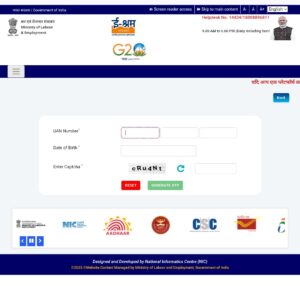
How to Download E Shram Card Online
The E Shram Card process is completely online and free. Therefore, you do not need to visit any government office.
Follow these steps carefully:
- First, visit the official e-Shram portal
- Then, click on the “Already Registered” option
- After that, select “Update / Download E Shram Card”
- Now, enter your registered mobile number
- Next, verify using the OTP sent to your mobile
- Finally, download your E Shram Card in PDF format
Consequently, your card will be saved on your device and ready to use.
E Shram Card Download by Mobile Number
Most users prefer E Shram Card by mobile number because it is the easiest method. However, the mobile number must be the same as used during registration.
Firstly, enter your registered mobile number on the portal. Then, request an OTP. After verification, you will instantly access your dashboard. From there, you can download the card.
Moreover, this method works on both mobile phones and desktops. Therefore, it is highly recommended for quick access.
E Shram Card Download by Aadhaar Number
If you do not remember your UAN, you can still complete the E Shram Card using your Aadhaar number.
Here is how it works:
- Select the Aadhaar option on the portal
- Enter your Aadhaar-linked mobile number
- Verify using OTP authentication
- Access your profile and download the card
Additionally, Aadhaar verification increases security and prevents misuse. Hence, the government promotes Aadhaar-based access for accuracy.
How to Download E Shram Card PDF
The E Shram Card option allows users to store or print their card easily. Therefore, it is useful for official documentation and scheme enrollment.
After successful login, simply click on the Download PDF button. Then, the card will be downloaded in high quality. Moreover, the PDF includes your UAN, personal details, and QR code.
In addition, you can open the PDF anytime without internet access. As a result, it is advisable to keep a digital copy saved on your phone.
E Shram Card Download Without OTP (Is it Possible?)
Many users search for E Shram Card without OTP. However, officially, it is not possible.
This is because OTP verification ensures data privacy and security. Without OTP, unauthorized access could occur. Therefore, the government has made OTP mandatory for every login.
Nevertheless, if you are not receiving OTP, you should update your mobile number or try again later. In short, OTP is compulsory for E Shram Card Download.
E Shram Card Download Status Check
Sometimes users are unsure whether their card is ready. In such cases, E Shram Card status check becomes important.
To check the status:
- Visit the e-Shram portal
- Enter your mobile number or UAN
- Verify using OTP
- Check registration and download status
If your registration is complete, the download option will appear. Otherwise, you may need to complete pending details.
Common Problems While Downloading E Shram Card
Although the process is simple, users may face issues during E Shram Card. However, most problems have easy solutions.
1. OTP Not Received
This usually happens due to network issues. Therefore, wait a few minutes or try again.
2. Mobile Number Not Active
If your registered number is inactive, you must update it through the portal.
3. Aadhaar Mismatch
Ensure that Aadhaar details match your registration data. Otherwise, verification may fail.
4. Website Not Loading
Due to heavy traffic, the portal may slow down. In that case, try during non-peak hours.
Conclusion
The E Shram Card process is essential for every registered unorganized worker. Whether you download it using a mobile number or Aadhaar, the process remains secure and user-friendly. Moreover, keeping a PDF copy ensures easy access to government benefits.
Therefore, if you are already registered, download your E Shram Card today and stay prepared for future schemes. In conclusion, the e-Shram initiative is a powerful step toward social security and worker empowerment in India.

