
The E-Aadhaar Card Download facility has made identity verification in India faster, safer, and more convenient than ever before. Instead of carrying a physical Aadhaar card everywhere, citizens can now easily access a secure digital copy anytime, anywhere. Moreover, this digital version is legally valid and widely accepted by government departments, banks, and private institutions.
In fact, millions of Indians rely on e-Aadhaar for online verification, subsidies, KYC processes, and official documentation. Therefore, understanding how to download and use it correctly is essential. This guide explains everything step by step, ensuring clarity and ease of use for every Aadhaar holder.
What Is an E-Aadhaar Card?
An e-Aadhaar card is the electronic version of your physical Aadhaar card issued by UIDAI (Unique Identification Authority of India). However, it is not just a scanned copy; rather, it is a digitally signed PDF document that holds legal validity under the Aadhaar Act.
Moreover, the e-Aadhaar contains all essential details such as your name, photograph, Aadhaar number, date of birth, and address. Additionally, it comes with a secure QR code that allows instant offline verification. Therefore, it is considered just as reliable as the physical Aadhaar card.
In fact, UIDAI encourages citizens to use e-Aadhaar to reduce paper usage and enhance data security. Consequently, the E-Aadhaar Card Download option has become increasingly popular across India.
How to Download E-Aadhaar Card Online
The process of E-Aadhaar Card Download online is simple and user-friendly. However, you must ensure that your Aadhaar is linked with a valid mobile number to receive the OTP.
Basic Requirements:
- Aadhaar number / VID / Enrolment ID
- Registered mobile number
- Internet-enabled device
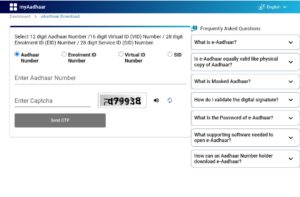
Firstly, visit the official UIDAI portal. Then, select the e-Aadhaar download option and enter the required details. After that, verify your identity using the OTP sent to your registered mobile number. Finally, download the PDF file securely to your device.
Therefore, within minutes, you can access your Aadhaar digitally without visiting any Aadhaar center.
E-Aadhaar Card Download Using UIDAI Website
The UIDAI website is the most trusted and official platform for E-Aadhaar Card Download. Moreover, it ensures data privacy and authenticity.
Step-by-Step Process:
- Go to the official UIDAI website
- Click on “Download Aadhaar”
- Enter Aadhaar Number / VID / EID
- Choose Regular or Masked Aadhaar
- Request OTP
- Enter OTP and download PDF
However, make sure your internet connection is stable. Additionally, always verify that you are on the genuine UIDAI website to avoid fraud. Therefore, using the official portal is the safest way to download your Aadhaar.
E-Aadhaar Card Download via mAadhaar App
The mAadhaar app offers a mobile-friendly way to access Aadhaar services. Moreover, it allows users to store and manage Aadhaar details on their smartphones.
To begin with, download the mAadhaar app from the Google Play Store. Then, register your Aadhaar number using OTP verification. After successful login, you can easily access the E-Aadhaar Card Download feature.
Additionally, the app supports multiple Aadhaar profiles, making it useful for families. In fact, it also provides services like address update status, Aadhaar verification, and QR code scanning. Therefore, mAadhaar is a powerful and convenient option for digital Aadhaar access.
Masked E-Aadhaar Card Download
A masked e-Aadhaar is a privacy-focused version of the Aadhaar card. However, it hides the first eight digits of your Aadhaar number, displaying only the last four digits.
This option is particularly useful when submitting Aadhaar as ID proof to private organizations. Moreover, it reduces the risk of misuse and identity theft. Therefore, UIDAI strongly recommends using masked Aadhaar wherever full Aadhaar disclosure is not mandatory.
During the E-Aadhaar Card Download process, simply select the “Masked Aadhaar” option. Consequently, you will receive a secure and privacy-friendly document suitable for most verification purposes.
E-Aadhaar Card PDF Password
Many users face difficulty opening the downloaded Aadhaar PDF. However, the solution is simple. UIDAI protects the e-Aadhaar PDF with a password to ensure data security.
PDF Password Format:
- First 4 letters of your name (in CAPITAL letters)
- Year of birth (YYYY)
For example, if your name is Rohit Kumar and your birth year is 1998, the password will be ROHI1998.
Therefore, always remember this format while opening your E-Aadhaar Card Download PDF. Additionally, keep the file stored securely on your device to prevent unauthorized access.
E-Aadhaar Card Download Using Mobile Number
If your Aadhaar is linked with a mobile number, the E-Aadhaar Card process becomes seamless. In fact, OTP-based authentication is the most commonly used method.
Firstly, enter your Aadhaar number on the UIDAI website or mAadhaar app. Then, request OTP verification. After receiving the OTP on your registered mobile number, enter it to authenticate your identity.
Moreover, this method ensures maximum security. Therefore, keeping your mobile number updated with Aadhaar is extremely important for uninterrupted access to services.
Is It Possible to Download an E-Aadhaar Card Without OTP?
This is one of the most frequently asked questions. However, the answer is No. UIDAI does not allow E-Aadhaar Card without OTP verification.
The OTP system is mandatory to protect user identity and prevent unauthorized access. Therefore, if you do not have access to your registered mobile number, you must update it at an Aadhaar Seva Kendra.
Although this may seem inconvenient, it significantly enhances data protection. Consequently, OTP verification remains a critical security layer in Aadhaar services.

